Back to projects

Project case study

Touchless Web Gesture Interface

Workspace controlled by hand gestures on the camera, with an adaptive frame pipeline and a custom gesture engine.
My roleAnalyst/Developer
Technologies used
  • MediaPipe Tasks Vision
  • Canvas API
  • Next.js
  • React
  • TypeScript
  • Framer Motion
  • Zod
  • 1 more technology
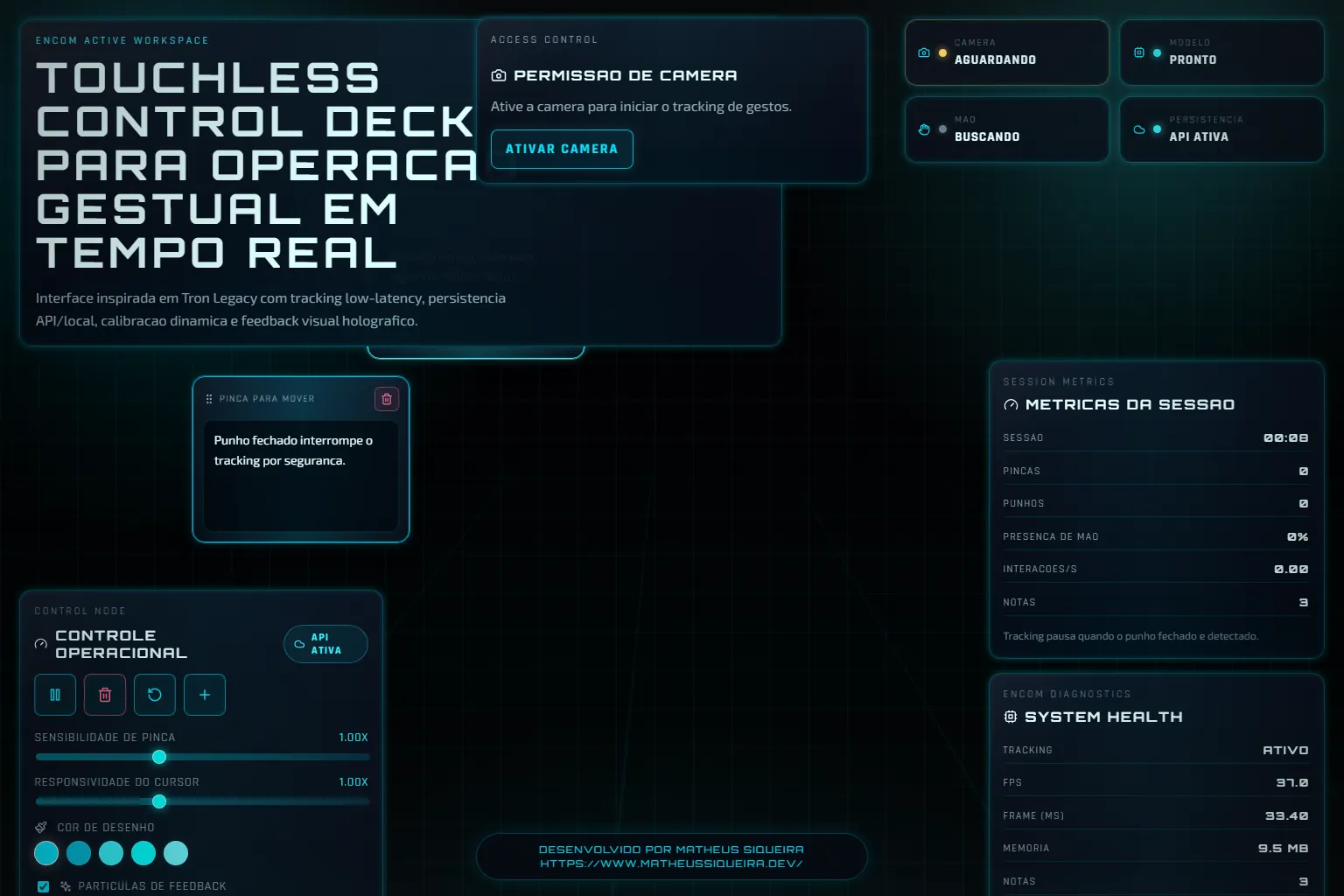
ENCOM workspace with the camera permission panel, the operating controls and the session metrics.
interface-web-de-gestos-sem-contato.vercel.app / Home page

Problem

Using a screen without touching it needs a steady cursor from a noisy signal.

Running inference all the time burns CPU even when no hand is in view.

Solution

Architecture at a glance
  • Frames from the user's camera, processed in the browser.
  • Workspace notes and drawings, saved to the application API with localStorage as a fallback.
Technical decisions
  1. Capture at 30 fps with retry and inference scheduled through requestVideoFrameCallback.
  2. Adaptive throttling: 30 fps with a hand, 10 fps without, paused when the tab is hidden.
  3. Gesture engine with speed-based smoothing, pinch hysteresis and confidence.

Result

Inference cap with and without a hand
30 / 10 fps
Public repository / configuration in src/hooks/useHandTracking.ts / commit cde44c9
Vitest test suites
8
Public repository / test files in the repository / commit cde44c9

The project shows a frame pipeline that saves inference and a custom gesture engine.

  • Adaptive frame pipeline
  • Touchless interaction
  • Canvas 2D
  • Graceful degradation

Learnings and limitations

  • Requires a camera; the model and WASM come from a CDN.
  • Drawing and dragging have no mouse or keyboard equivalent.
  • In production, the server workspace lives in memory, is shared and is lost between instances.
  • The particle system does not honour reduced motion.

More about the project

Full case details, collapsed for optional reading.

Full description

Notes and drawing workspace controlled by the camera: the hand replaces the mouse, with no install and no video sent anywhere.

The pipeline captures at 30 fps, schedules inference per video frame and drops to 10 fps after more than 10 frames without a hand.

A custom gesture engine smooths the cursor by speed and applies hysteresis to the pinch, normalised by hand scale.

Pinching draws on the Canvas and drags notes; sliders tune the sensitivity, and the button controls stay available without a camera.

Next.js 16 and React with MediaPipe Tasks Vision, Canvas 2D for drawing and particles, Framer Motion in the interface and Vitest tests.

Features and highlights
  • Pinch to draw.
  • Pinch to drag notes.
  • Pinch and cursor sensitivity tuning.
  • Session metrics and FPS.
  • Undo and redo with 30 states.
  • Drops inference from 30 to 10 fps when no hand is in view.
  • Applies pinch hysteresis normalised by hand scale.
  • Pauses tracking when the tab is hidden.
  • Keeps button controls when the camera is unavailable.
Technical architecture and data
  • State emitted at most at 60 Hz, with a movement threshold.

Technical architecture

How the case was designed as a product

Workspace controlled by hand gestures on the camera, with an adaptive frame pipeline and a custom gesture engine.

MediaPipe Tasks VisionAICanvas APIWeb platformNext.jsFrameworkReactFrameworkTypeScriptLanguageFramer MotionFrameworkZodFrameworkVitestFramework

Data used

  • Frames from the user's camera, processed in the browser.
  • Workspace notes and drawings, saved to the application API with localStorage as a fallback.

Core components

  • Pinch to draw.
  • Pinch to drag notes.
  • Pinch and cursor sensitivity tuning.
  • Session metrics and FPS.
  • Undo and redo with 30 states.

Technical decisions

  • Adaptive frame pipeline
  • Touchless interaction
  • Canvas 2D
  • Graceful degradation

Trade-offs

  • Requires a camera; the model and WASM come from a CDN.
  • Drawing and dragging have no mouse or keyboard equivalent.
  • In production, the server workspace lives in memory, is shared and is lost between instances.
  • The particle system does not honour reduced motion.
How to run
  1. npm install
  2. cp .env.example .env.local
  3. npm run dev and open http://localhost:3000
  4. npm run test
Additional media
Project demonstration video.
Credits

Developed by Matheus Siqueira - https://www.matheusdev.tech

Next projectSupport SLA Intelligence Hub

Next.js BI dashboard measuring SLA, backlog, MTTR and at-risk tickets over 780 synthetic tickets.

View full case