Back to projects

Project case study

ENCOM Gesture Console

Futuristic console with webcam gesture detection, visual telemetry, and real-time 3D effects.
My roleFrontend and in-browser AI Developer
Technologies used
  • JavaScript
  • TensorFlow.js
  • MediaPipe Hands
  • Three.js
  • HTML
  • CSS
  • Vercel
ENCOM Gesture Console cover
Project cover

Problem

Computer vision demos often split camera feed, logs, and technical visualization across different surfaces.

The experience needed to show capture, model status, and visual feedback in one memorable interface.

Solution

Architecture at a glance
  • Webcam frames processed locally in the browser.
  • Hand landmarks provided by MediaPipe Hands.
  • Labeled gesture samples for training and validation.
Technical decisions
  1. Static web console with dedicated panels for capture, telemetry, and 3D rendering.
  2. Client-side pipeline with MediaPipe Hands and TensorFlow.js for real-time sign recognition.
  3. Visual trainer to collect samples, validate gestures, and export models.

Result

Delivered a high-impact experience for demonstrating in-browser AI.

  • Browser computer vision with MediaPipe Hands.
  • Lightweight gesture classification and training with TensorFlow.js.
  • Interactive 3D rendering with Three.js.
  • Technical interface design with clear telemetry for demos.

More about the project

Full case details, collapsed for optional reading.

Full description

Web application deployed on Vercel that combines MediaPipe Hands, TensorFlow.js, and Three.js to capture hand signs, render special effects in separate panels, and surface operational metrics in an ENCOM-inspired interface.

The project runs entirely in the browser and includes a dedicated flow for training new gestures, keeping the experience ready for high-impact technical demos.

JavaScript, MediaPipe Hands, TensorFlow.js, and Three.js in a static application deployed on Vercel.

Centralized capture, telemetry, and visual effects in a single console.

Left a foundation ready for new gestures, new effects, and future integrations.

Problem

  • It had to run in the browser without mandatory installation or backend services.
  • New gesture training needed to be clear enough for live demonstrations.

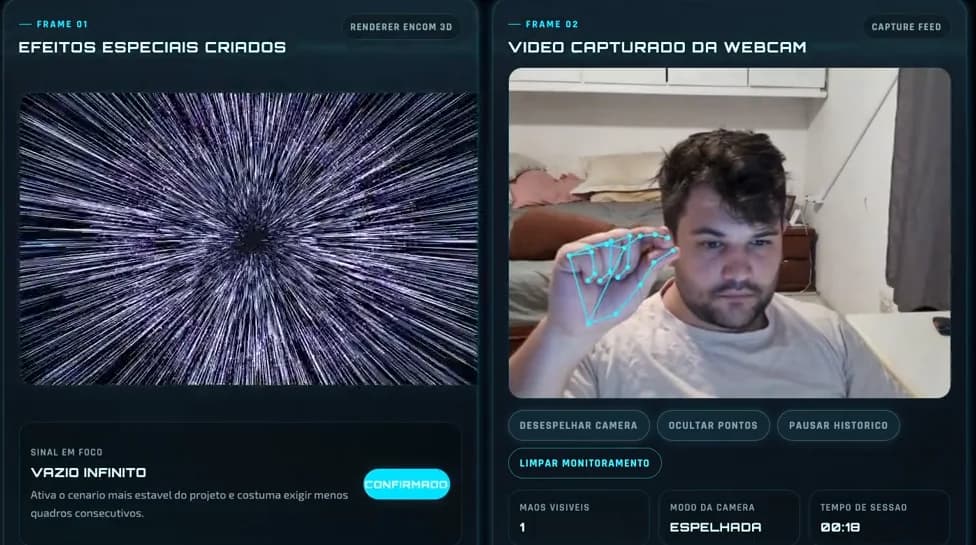
What the video shows

  • Webcam gesture capture directly in the browser.
  • Separate panels for camera, telemetry, session status, and 3D effects.
  • Visual trainer to collect samples, validate signs, and export models.

Experience architecture

  • Static frontend with JavaScript, HTML, and CSS.
  • MediaPipe Hands and TensorFlow.js for gesture reading and classification.
  • Three.js for visual rendering and immersive real-time feedback.
Features and highlights
  • Real-time gesture detection through the browser webcam.
  • ENCOM-style interface with dedicated panels for capture and 3D effects.
  • Visual telemetry for session, status, and recognition confidence.
  • Visual trainer to collect samples, validate, and export models.
  • Static Vercel deployment ready for demos and evaluations.
Technical architecture and data
  • Three.js visual layer to turn detection into a premium demo experience.

Technical architecture

How the case was designed as a product

Futuristic console with webcam gesture detection, visual telemetry, and real-time 3D effects.

JavaScriptLanguageTensorFlow.jsAIMediaPipe HandsAIThree.jsVisualizationHTMLWeb platformCSSWeb platformVercelDeploy

Data used

  • Webcam frames processed locally in the browser.
  • Hand landmarks provided by MediaPipe Hands.
  • Labeled gesture samples for training and validation.
  • Session metrics, confidence, and operational status of the experience.

Core components

  • Real-time gesture detection through the browser webcam.
  • ENCOM-style interface with dedicated panels for capture and 3D effects.
  • Visual telemetry for session, status, and recognition confidence.
  • Visual trainer to collect samples, validate, and export models.
  • Static Vercel deployment ready for demos and evaluations.

Technical decisions

  • Browser computer vision with MediaPipe Hands.
  • Lightweight gesture classification and training with TensorFlow.js.
  • Interactive 3D rendering with Three.js.
  • Technical interface design with clear telemetry for demos.
How to run
  1. Clone the repository.
  2. Install dependencies according to the project README.
  3. Run the local server or open the Vercel demo.
  4. Allow webcam access to test gesture capture.
Additional media
Demo of the ENCOM console with capture, telemetry, and 3D effects.
Credits

Developed by Matheus Siqueira.

Next projectAd Performance Intelligence

Next.js BI dashboard comparing Google Ads and Meta Ads on simulated data: KPIs, funnel and ROAS.

View full case